 UPDF
UPDF
 UPDF için Windows
 UPDF Mac için
 iPhone/iPad için UPDF
 UPDF için Android
 UPDF AI Online
 UPDF Sign
 PDF Düzenle
 PDF Not Ekle
 PDF Oluştur
 PDF Formu
 Linkleri Düzenle
 PDF Dönüştür
 OCR
OCR PDF → Word
 PDF → Görsel
 PDF → Excel
 PDF Düzenle
 PDF Birleştir
 PDF Böl
 PDF Kırp
 PDF Döndür
 PDF Koru
 PDF İmzala
 PDF Düzenle
 PDF Temizle
 Güvenliği Kaldır
 PDF Oku
 UPDF Bulut
 PDF Sıkıştır
 PDF Yazdır
 Toplu İşlem
 UPDF AI Hakkında
 UPDF AI Çözümleri
 Yapay Zeka Kullanım Kılavuzu
 UPDF AI Hakkında Sıkça Sorulan Sorular
 PDF'yi Özetle
 PDF'yi Çevir
 PDF'yi açıkla
 PDF ile sohbet edin
 Yapay Zeka ile Sohbet
 Görüntü ile sohbet
 PDF'den Zihin Haritasına
 PDF AI Araçları
 Görsel AI Araçları
 AI Sohbet Araçları
 AI Yazma Araçları
 AI Çalışma Araçları
 AI İş Araçları
 Diğer AI Araçları
 PDF to Word
 PDF to Excel
 PDF to PowerPoint
 Kurumsal Çözüm
 Kurumsal Plan
 Kurumsal Kullanıcı Kılavuzu
 Kurumsal Webinar
 Bankacılık
 Sağlık Hizmetleri
 Sigorta
 Hukuk
Hukuk İmalat
 Hükümet
 Eğitim Çözümü
 Müşteri Hikayeleri
 Kullanıcı Kılavuzu
 UPDF Püf Noktaları
 Sıkça Sorulan Sorular
 UPDF Yorumları
 İndirme Merkezi
 Blog
Blog Haber Merkezi
 Teknik Özellikler
 Güncellemeler
 UPDF vs. Adobe Acrobat
 UPDF vs. Foxit
 UPDF vs. PDF Expert

Introduction of UPDF 1.0 for Mac
UPDF for Mac is a "Universal, Productive, Delightful, Fast" PDF editor with AI integration. A stunning UI, whimsical design elements, and powerful functionality make it a great option for business, academic, and professional use. The user-friendly interface means you can process heavy workflows with ease. You can download UPDF for from APP Store or via the below button and check all its features with us.
Windows • macOS • iOS • Android %100 güvenli
Top Features of UPDF for Mac
You can watch the below video to learn all the features that UPDF for Mac offers.
- Powerful UPDF AI: summarize PDF, translate PDF, explain PDF, convert PDF to Mind Map, chat with image, and ask AI anything.
- Eyes-friendly PDF reader: Zoom in/out, jump to a specific page, play PDF as a slideshow, compare PDF files, read in different display modes, show cover page in two-page view, switch between light and dark mode, find text in PDF quickly, and more.
- Create PDF: Create a blank page and create PDF from Image, Word, Excel, PowerPoint, CAJ, Selection Capture, Window, Capture, Screen Capture, Clipboard, and Scanner.
- PDF editing: Editing texts, images, links, watermarks, background, header and footer in PDF.
- A robust suite of PDF annotation tools: sticky note, highlight, strikethrough, underline, squiggly, text comment, text box, text callout, pencil, eraser, shapes, PDF measurement, attachment, stickers, stamps, and signature.
- Easy PDF page management: Insert, replace, extract, split, rotate, delete, and crop pages in PDF.
- File conversion from PDF to other popular file formats: Convert PDF to Word, Excel, PowerPoint, CSV, RTF, Text, Images (PNG, JPG, TIFF, GIF), XML, HTML, and PDF/A.
- OCR PDF: Convert scanned documents into searchable and editable PDFs and create image-only PDFs from searchable and editable PDFs. (The Mac with Apple Chip version from the official website has the OCR feature. However, the Mac with Intel Chip version and the Mac App Store version haven't released the OCR feature yet.)
- Create, fill, and sign PDF forms: It supports creating fillable PDF forms manually by adding a text field, check box, radio button, dropdown, list box, button, image field, date field, and digital signature and automatically by form field recognition.
- Encrypt PDF with a password: Password protects PDF from opening, printing, copying, and editing. You can also remove the security and add new ones.
- Redact PDF: Permanently removing sensitive contents in PDF by marking for redaction, redacting pages, and finding text to redact.
- Flatten PDFs: Flatten annotations and forms, watermarks, and cropped pages.
- Batch process: It can batch combine, convert, insert, encrypt, create multiple PDFs, and add Bates numbering to different PDFs.
- Optimize and reduce the PDF file size: Reduce the PDF file size according to the document quality you selected.
- Share PDF file: Share PDF with link, QR code, and email.
- UPDF Cloud: Store PDF files in UPDF Cloud and sync them across devices.
- Print PDF: Print PDF per the settings you need.
Languages Supported by UPDF for Mac
UPDF for Mac supports 11 languages. Here are all of them:
- English
- French
- German
- Italian
- Spanish
- Portuguese
- Russian
- Chinese Traditional
- Chinese Simplified
- Japanese
- Korean
Interface of UPDF for Mac
To try all the above features, you can download it from the button below. If you are interested in using its premium version, you can upgrade now. And once you have the UPDF on your Mac computer, you can find all the tools by checking the below interface.
Windows • macOS • iOS • Android %100 güvenli
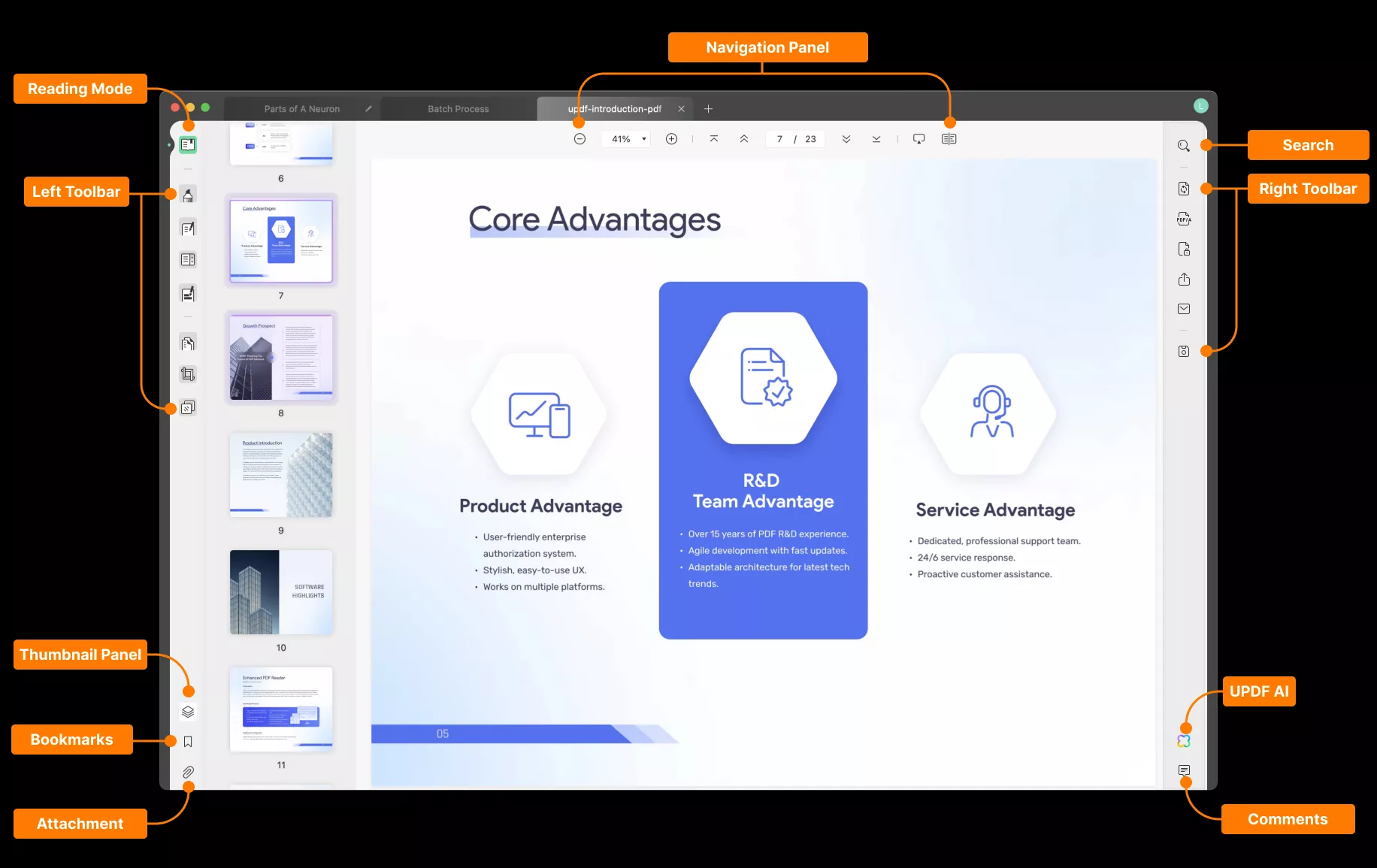
PDF Company Introduction
To help you have a better understanding of UPDF, an introductory PDF has been added below. This document provides a visual summary of UPDF's key features and functionalities, highlighting its ease of use, advanced capabilities, and multilingual support. This PDF allows users to quickly familiarize themselves with UPDF's powerful tools for PDF viewing, editing, conversion, OCR, and more on Mac devices. Click and check now.
